Flamingo Float AI Trend
Your photo. A giant pink flamingo pool float.
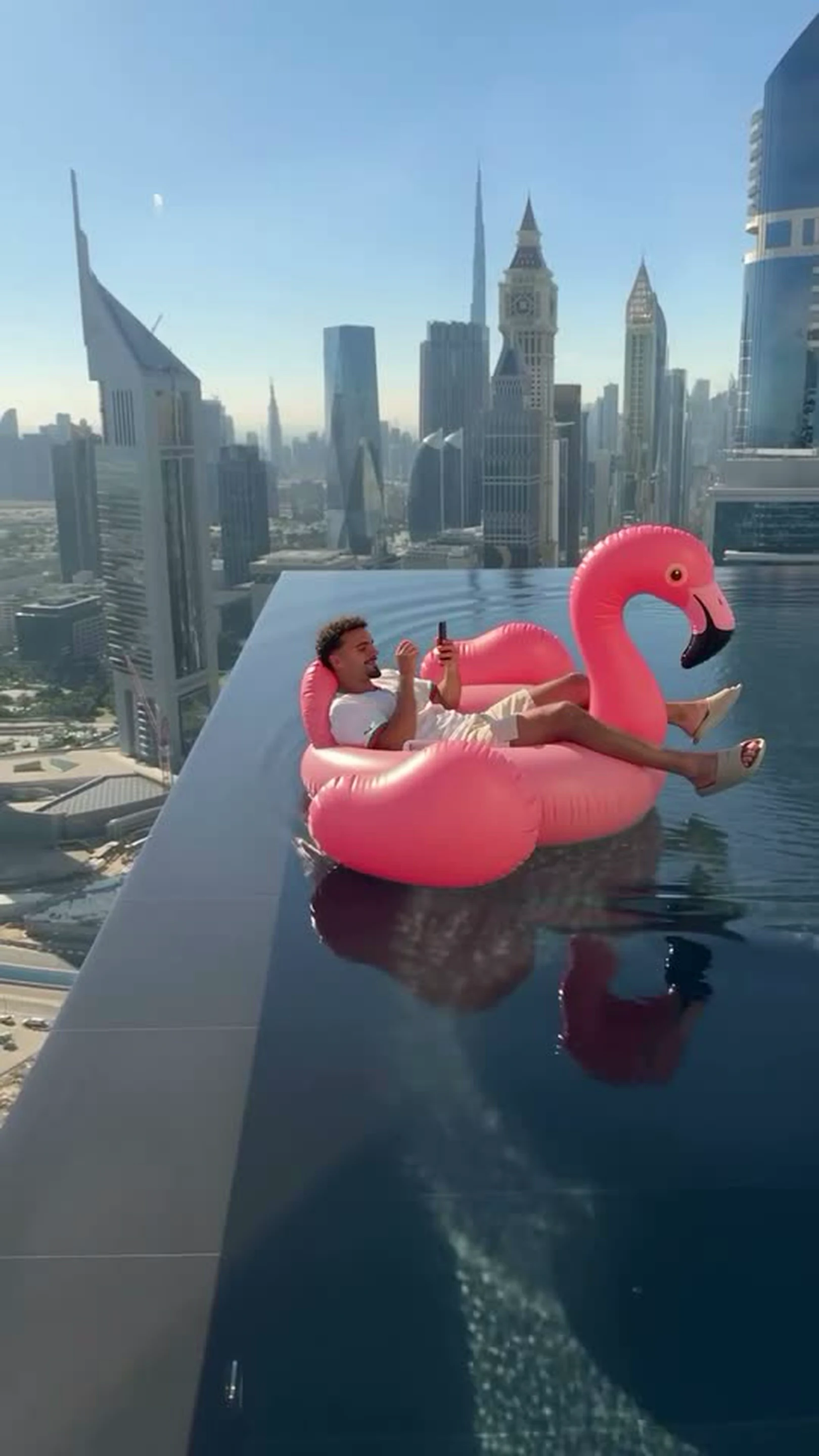
Make the Flamingo Float AI trend with one photo: your person lounges on a giant pink inflatable flamingo pool float in a rooftop infinity pool while the camera follows the float and a hand reaches in from the pool edge. The template supplies the scene, the short “Hey bro, thank you” exchange and the camera move.
- 1 photo: the person on the float
- 12-second video with sound
- Portrait 9:16 format
Each video is newly generated from the template’s shot and camera move. Faces, clothing and small details may differ from the preview. Check the credit quote in the form and sign in to generate.
Create your float
The person on the float
No photo selected
JPG, PNG or WebP · Under 30 MB · One consenting adult per photo · Face clear, front-facing and unobstructed
Photo requirements
Use a clear, front-facing photo with the whole face visible and unobstructed; avoid sunglasses, masks, hands or hair over the face, heavy filters and extreme angles. Each side: 301–5,999 pixels; aspect ratio greater than 0.4 and less than 2.5; up to 40 megapixels. Show the face and some clothing. Phone uploads go to this portrait.
Video settings Model, quality and format
This template always creates a 12-second portrait 9:16 video. Available quality depends on the selected model.
Loading available settings…
AI-generated audio. The reference clip guides the style and rhythm; the generated sound and timing may vary.
Loading template settings…
What happens in the Flamingo Float video
The Flamingo Float AI trend follows one continuous rooftop infinity-pool take. It is a recast of the source clip, not a newly staged scene.
- Opening: the person reclines on the giant pink flamingo pool float near the infinity edge, looking at the phone, with the water and city skyline in frame.
- About 3–5 seconds: a hand and forearm reach in from the lower right of frame, and an off-screen voice says “Hey, bro, bro, bro.”
- Reply: the person turns his head toward the hand and answers “Hey, thank you, thank you.”
- Final seconds: the camera pulls back and rises, the flamingo pool float grows smaller toward the infinity edge, and the water fills the lower frame.
The rooftop infinity pool, city skyline, giant pink inflatable flamingo pool float, the hand and the camera move are fixed. Your portrait supplies the person’s face, hair, body proportions, skin tone and clothing.
Before you create
What is the Flamingo Float AI trend?
It is a short rooftop infinity-pool clip built around a giant pink flamingo pool float, a hand reaching in from the pool edge and a “Hey bro, thank you” exchange. Kinevello’s version lets you replace the person on the float with one photo while keeping the scene, float and camera move.
How do I make a Flamingo Float AI video?
Open this template, add one clear portrait for the person on the float, then review the model, quality and credit quote in Video settings. Confirm that you have permission to use the photo and select Create my float. The template supplies the rooftop infinity pool, skyline, flamingo pool float and camera movement; you do not need to write a prompt or upload a video. Follow the Flamingo Float photo and setup guide for a step-by-step walkthrough.
Can I choose Dubai, Singapore or another city?
No. This template follows one source shot with a fixed city skyline and has no city picker. A different setting or skyline is not available here; use the video studio for a custom scene instead.
Can I make a couple version?
No. This template accepts one consenting adult per photo and replaces one person on the float. It does not support a second person, a couple or a group photo.
Is the float a pink inflatable flamingo pool float?
Yes. The template supplies one fixed giant pink inflatable flamingo pool float with a black beak, visible eye, air seams and printed marks. It does not use a customer-provided float and is not affiliated with any pool-float brand.
How long is the video, and does it have sound?
Every result is a 12-second portrait 9:16 video with generated audio. The reference clip guides the style and rhythm; the final sound may differ from the preview.
Will my video follow the template’s movement?
Your person follows the template’s camera move, float drift and gestures in the shot. Check the finished video’s identity, the hand at the pool edge and the motion before sharing; individual results may differ from the preview.
Can I add a platform sound later?
Keep the original download and use our audio remover to make a silent copy, then choose an available platform sound. This removes generated vocals too; read the audio removal guide before changing tracks. Check account, region and commercial-use permissions. Permissions do not automatically transfer between apps.
Where do I find my video?
Follow the result here or in History. Download within 15 days. Confirmed failures return reserved credits; uncertain submissions stay reserved until resolved.
Choose the right template for your photo
Use this Flamingo Float AI trend template to place one person on a giant pink flamingo pool float in the rooftop infinity-pool scene. Want a full band performance? Try Outstanding Tiny Desk. For a one-photo performance with your own lyrics, use Bulin 47 freestyle. For a two-person scene, explore Hotel Lobby.
Read the Flamingo Float tutorial · Compare all video templates
How do I make a Flamingo Float AI video?
Kinevello’s Flamingo Float AI trend template turns one portrait into a 12-second portrait video of a person reclining on a giant pink flamingo pool float in a rooftop infinity pool above a city skyline. Your photo guides that person’s face, hair and clothing. The template supplies the pool, skyline, inflatable flamingo, the hand at the pool edge, the short “Hey bro, thank you” exchange and the camera move.
- Add one clear portrait of yourself or a consenting adult. On a computer, you can use the phone upload button to send a photo by QR code.
- Open Video settings, choose a compatible model and quality, and read the exact credit total. The format stays 9:16 portrait and the length stays 12 seconds.
- Confirm that you have permission to use the photo, then create once. There is no prompt box, city picker, lyrics or dialogue field.
- Review the finished video for identity, movement and framing, then download it within 15 days.
This is a one-photo recast of the rooftop infinity-pool clip. It does not offer a couple version or a city selector. AI-generated audio follows the reference clip’s style and rhythm; the final sound, timing and details may differ from the preview. Read the Flamingo Float tutorial · Compare video templates · Understand video credits