Flamingo Float AI Trend: How to Make the Hey Bro, Thank You Bro Video
To make the Flamingo Float AI trend in Kinevello, open the Flamingo Float template, add one clear portrait, choose a compatible model and quality, review the credit quote and create a 12-second portrait video. Your photo guides the person’s face, hair and clothing while the template supplies the rooftop infinity pool, skyline, giant pink flamingo pool float, the hand at the pool edge, the “Hey bro, thank you” exchange and the camera movement.
What the Flamingo Float AI trend is
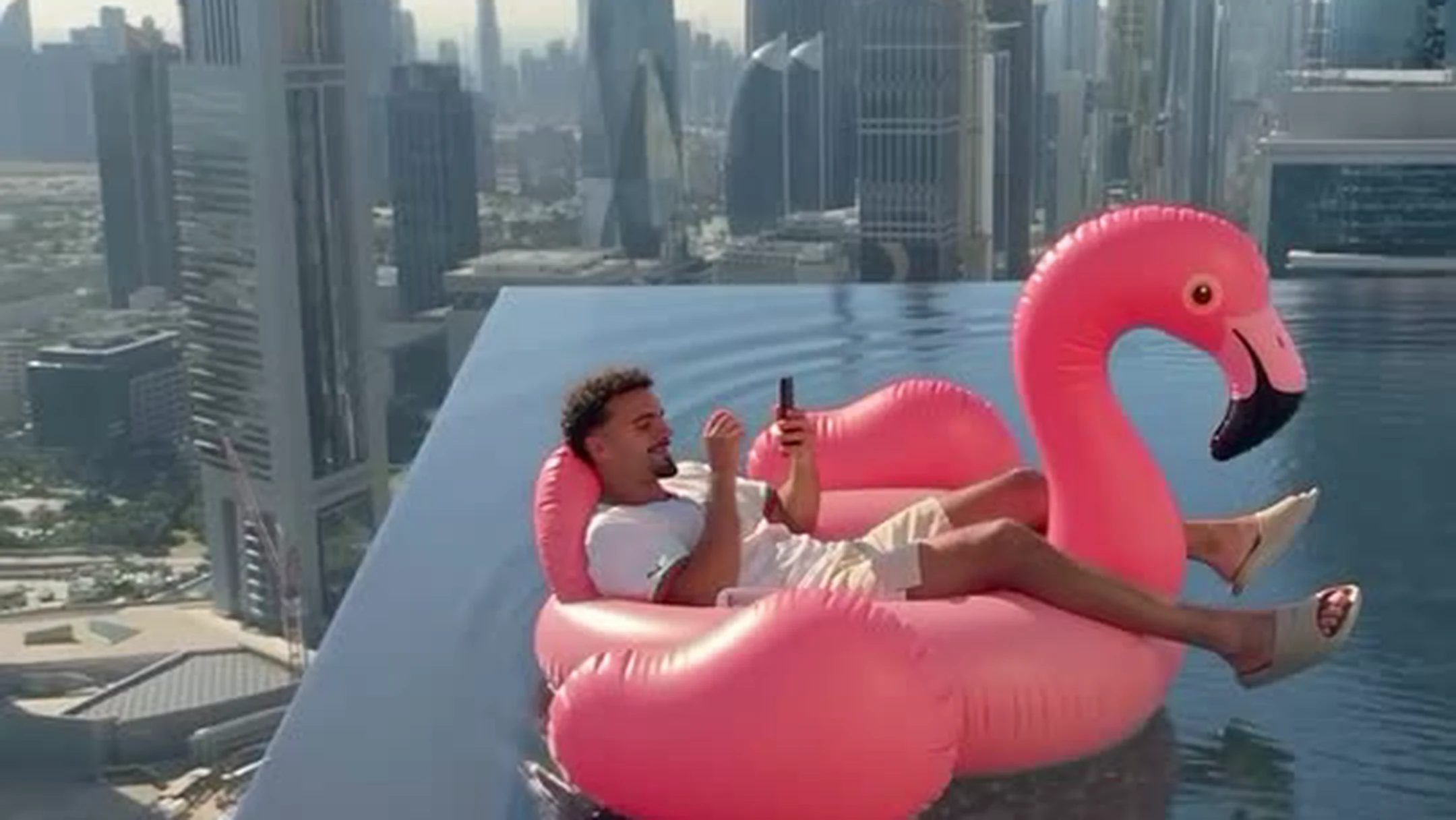
Flamingo Float AI is a short rooftop infinity-pool trend built around a giant pink flamingo pool float. One person reclines on the inflatable flamingo near the edge of the water while the camera follows the float, a hand reaches in from the pool edge and a short “Hey bro, thank you” exchange plays over the clip. The camera starts at the pool edge, looks down at the float and follows as it drifts across the water toward a city skyline.
You supply the person; the template supplies the scene and movement. Kinevello uses your portrait to guide that person’s face, hair and clothing. You do not write a prompt, record a video or choose a different location. The output is a 12-second portrait video with generated sound.
The preview on the template page is a reference clip, not a video generated by Kinevello. Individual results can differ in likeness, small gestures, the float’s drift and background detail. Kinevello is independent of the creators of any similar trend clip.
The “Hey bro, thank you” exchange
The template directs two short lines in casual English. The off-screen camera operator, whose hand reaches in from the lower right, calls “Hey, bro, bro, bro.” After the person on the float turns his head toward the hand, he answers “Hey, thank you, thank you.”
Both lines are spoken at normal volume over a light poolside groove that follows the reference. The template requests generated audio, so the voices, volume, timing and lip movement can differ from the preview. There is no dialogue or lyrics field, and adding a different line is not an available option.
The hand and forearm belong to the camera operator, not to the person on the float. Your photo does not replace them; they keep their source appearance, size, timing and motion.
What happens in the clip, second by second
- Opening: the person reclines on the giant pink flamingo pool float near the infinity edge, looking at the phone, with the water and city skyline in frame.
- About 3–5 seconds: a hand and forearm reach in from the lower right of frame, and an off-screen voice says “Hey, bro, bro, bro.”
- Reply: the person turns his head toward the hand and answers “Hey, thank you, thank you.”
- Final seconds: the camera pulls back and rises, the flamingo pool float grows smaller toward the infinity edge, and the water fills the lower frame.
The whole clip is one continuous take. There are no cuts, no second camera angle and no city selector. The rooftop infinity pool, skyline, giant pink inflatable flamingo pool float, the hand and the camera move stay fixed; your portrait changes the person on the float.
What you need
- One portrait: a clear photo of yourself or a consenting adult, with the face visible and some clothing showing.
- Rights to the photo: only submit images you are permitted to use. Public figures, celebrities and politicians are not allowed.
- Credits for the chosen settings: check the exact quote on the template form before creating.
JPG, PNG and WebP are supported, under 30 MB per image. Open Photo requirements beside the uploader for the current size and aspect-ratio limits. A single-person photo is easier to interpret than a group shot, a very tight crop or a face hidden by sunglasses or a heavy filter.
How to make your Flamingo Float video
Watch the preview
Open the Flamingo Float AI trend template and select Play with sound. Watch where the hand appears, how the float turns and how the camera follows it. Your video will follow this shot rather than a new scene.
Add one portrait
Select Choose your photo and add one image. If the photo is on your phone, use the phone upload button and scan the QR code on your computer. Check the preview before continuing; Remove photo clears the selection.
Choose the model and quality
Open Video settings. The template fixes the length at 12 seconds and the format at 9:16 portrait; the available quality depends on the selected model. The quote outside the settings panel updates with your choices.
Read the quote and generate
Confirm that you have permission to use the photo, check the credit total and select Create my float. Do not submit again while the first task is pending; follow its status instead.
Review and download
Check the person’s likeness, the hand at the pool edge, the float’s movement and the final framing. Download the video you want to keep within 15 days.
What you can change and what stays fixed
The template controls the rooftop infinity pool, the city skyline, the daylight, the giant pink inflatable flamingo pool float, the hand at the pool edge and the camera move. The person’s pose, the raised hand and the direction of the drift stay with the source shot.
You choose a compatible model and quality. The duration and portrait format do not change. There is no scene selector, prompt box, city picker or lyrics field. This template accepts one person only; it does not provide a couple version or a city selector. If you want a different setting or a written scene, use the video studio instead.
A generated result is a new interpretation, not a frame-perfect copy. Review facial likeness, hands, the float’s shape and background buildings before sharing. If an app overlay or watermark appears in a result, it came from generation and should be reviewed like any other detail.
Photo and framing tips
Use one visible, front-facing face with enough detail to identify the intended person. Avoid heavy beauty filters, extreme side profiles, and hands or hair covering the face. A photo with the head and shoulders clear is easier to work with than a distant full-body shot.
The face is small in the wide part of the shot, so a close, sharp, front-facing photo matters more than a full-body picture. The portrait supplies appearance; it does not need to match the source person’s pose or clothing. The template directs the reclining pose on the flamingo pool float; results may vary. Choose a photo you are comfortable seeing in a sunny, high-rise pool scene.
If you create another version, change one thing at a time: the portrait, the model or the quality. Compare the result with your intended outcome before spending more credits.
Credits, task progress and downloads
The template quote depends on the selected model and quality and includes the reference scene. Read the displayed total before submitting; a general studio price for another model or duration does not override the template quote.
Generation can take several minutes. A slow response is not proof of failure. Check your account history before starting another task. Reserved credits return automatically for a confirmed failure; see the credit guide for the difference between pending, failed and uncertain tasks.
Download completed videos within 15 days. Keep a local copy if you plan to edit or post later; the account is not permanent video storage. On a computer, the result offers a phone download option when available.
Adding music before you post
Keep your downloaded original. Use our audio remover to make a silent copy, then add a sound available in TikTok, Instagram or CapCut. Removing audio also removes generated vocals; follow the audio removal guide for the steps. Check permission for your account, region and intended use, especially advertising or commercial posts. Availability in one app does not grant permission to reuse the sound elsewhere. Changing tracks can affect timing and the feel of the drift.
Frequently asked questions
What is the Flamingo Float AI trend?
It is a short rooftop infinity-pool clip built around a giant pink flamingo pool float, a hand reaching in from the pool edge and a “Hey bro, thank you” exchange. Kinevello’s version replaces the person on the float with your photo while keeping the scene and camera move.
Does the video include the “Hey bro, thank you” lines?
The template directs an off-screen “Hey, bro, bro, bro.” and the reply “Hey, thank you, thank you.” The result uses generated audio, so voices, volume, timing and lip movement may differ from the preview. There is no field for writing your own line.
Do I need a full-body or swimwear photo?
No. The template keeps the source person’s reclining pose on the float. Use a clear head-and-shoulders photo with some clothing visible; the portrait does not need to match the pose. A close, sharp face works better because the face is small in the wide shot.
Can I choose Dubai, Singapore or another city?
No. Flamingo Float follows one rooftop infinity-pool shot with a fixed city skyline and has no city picker. The available settings change the model and quality, not the scene, skyline or float.
Can I make a couple version?
No. This template accepts one consenting adult per photo and replaces one person on the float. It does not support a second person, a couple or a group photo.
Is the float a pink inflatable flamingo pool float?
Yes. The template supplies one fixed giant pink inflatable flamingo pool float with a black beak, visible eye, air seams and printed marks. It is not a customer-provided float and Kinevello is not affiliated with any pool-float brand.
How long is the video, and does it have sound?
Every result is a 12-second portrait 9:16 video with generated audio. The reference clip guides the style and rhythm; the final sound and timing may differ from the preview.
Where do I find my video?
Follow the result on the template page or in History. Download it within 15 days. A pending task is not a failed task; wait for its status before creating another video.